使用Hexo的Next主题配置学习笔记

1.next主题安装

Hexo-Next主题应该是用的非常多的博客主题,安装方式常见的有两种:

  • (1)命令安装:
1
>> npm install hexo-theme-next@latest

 主题默认会安装在node_modules/hexo-theme-next下。

  • (2)克隆主题代码工程到themes文件夹:
1
>> git clone https://github.com/theme-next/hexo-theme-next themes/next

 然后,修改站点配置文件_config.yml,将theme字段改为next

1
2
3
4
# Extensions
## Plugins: https://hexo.io/plugins/
## Themes: https://hexo.io/themes/
theme: next

2.配置菜单页

2.1 打开菜单选项

 查询node_modules/hexo-theme-next/_config.ymlthemes/next/_config.yml里面menu:字段,将下面的注释都打开:

1
2
3
4
5
6
7
8
9
menu:
home: / || fa fa-home
about: /about/ || fa fa-user
tags: /tags/ || fa fa-tags
categories: /categories/ || fa fa-th
archives: /archives/ || fa fa-archive
schedule: /schedule/ || fa fa-calendar
#sitemap: /sitemap.xml || fa fa-sitemap
#commonweal: /404/ || fa fa-heartbeat

2.2 创建菜单内容

homearchives是已有的,无需额外创建页面,abouttagscategoriesschedule需要单独创建页面才能预览:

  • (1)创建about页:
1
2
3
4
5
6
7
8
9
10
11
12
13
14
15
16
17
18
19
20
21
# 1.创建页面about页
>> hexo new page about
# 2.添加about页内容:
>> vim source/about/index.md
# 修改为如下内容,具体描述可以按需修改:
---
title: About
date: 2026-01-09 19:54:50
type: "about"
---

# 关于我的博客
这是一个基于Hexo + Next主题搭建的静态个人博客,用于分享技术笔记和生活感悟。

## 1.个人简介
- 昵称:MirrorYuChen
- 擅长技术:C++/C,Python
- 联系方式:2458006366@qq.com

## 2.博客说明
本博客搭建于2026年,使用Hexo框架生成,部署在GitHub Pages上,主题采用Next。
  • (2)创建categories页:
1
2
3
4
5
6
7
8
9
10
11
# 1.创建categories页
>> hexo new page categories
# 2.修改categories页内容
>> vim source/categories/index.md
# 修改为如下内容:
---
title: categories
date: 2026-01-09 18:32:40
type: "categories"
layout: "categories"
---
  • (3)创建tags页:
1
2
3
4
5
6
7
8
9
10
11
# 1.创建categories页
>> hexo new page tags
# 2.修改categories页内容
>> vim source/tags/index.md
# 修改为如下内容:
---
title: tags
date: 2026-01-09 18:38:03
type: "tags"
layout: "tags"
---
  • (4)创建schedule页:
1
2
3
4
5
6
7
8
# 2.添加about页内容:
>> vim source/schedule/index.md
# 修改为如下内容,具体描述可以按需修改:
---
title: Schedule
date: 2026-01-09 19:54:50
type: "schedule"
---

 这样就配置好了相关菜单页。

3.本地搜索

  • (1)安装插件hexo-generator-searchdb
1
>> npm install hexo-generator-searchdb --save
  • (2)修改主题配置:查询node_modules/hexo-theme-next/_config.ymlthemes/next/_config.yml里面menu:字段,将下面的注释都打开:
1
2
3
4
5
6
7
8
9
10
# Local Search
# Dependencies: https://github.com/next-theme/hexo-generator-searchdb
local_search:
enable: true
# Show top n results per article, show all results by setting to -1
top_n_per_article: 1
# Unescape html strings to the readable one.
unescape: false
# Preload the search data when the page loads.
preload: false

4.设置个人形象

 首先,将要设置的图像放置到node_modules/hexo-theme-next/source/imagesthemes/next/source/images下;然后,修改node_modules/hexo-theme-next/_config.ymlthemes/next/_config.yml文件的avatar:字段:

1
2
3
4
5
6
7
8
# Sidebar Avatar
avatar:
# Replace the default image and set the url here.
url: /images/avatar.png
# If true, the avatar will be displayed in circle.
rounded: true
# If true, the avatar will be rotated with the cursor.
rotated: false

5.设置社交链接

 修改node_modules/hexo-theme-next/_config.ymlthemes/next/_config.yml文件的social字段:

1
2
3
4
5
6
7
8
9
10
11
12
13
14
# Social Links
# Usage: `Key: permalink || icon`
# Key is the link label showing to end users.
# Value before `||` delimiter is the target permalink, value after `||` delimiter is the name of Font Awesome icon.
social:
GitHub: https://github.com/MirrorYuChen || fab fa-github
E-Mail: 2458006366@qq.com || fa fa-envelope
#Weibo: https://weibo.com/yourname || fab fa-weibo
#Twitter: https://twitter.com/yourname || fab fa-twitter
#FB Page: https://www.facebook.com/yourname || fab fa-facebook
#StackOverflow: https://stackoverflow.com/yourname || fab fa-stack-overflow
#YouTube: https://youtube.com/yourname || fab fa-youtube
#Instagram: https://instagram.com/yourname || fab fa-instagram
#Skype: skype:yourname?call|chat || fab fa-skype

6.边栏默认打开

 修改主题的配置_config.yml文件,查找sidebar:,修改为如下内容:

1
2
3
4
5
6
7
8
9
10
11
12
13
14
15
16
17
18
19
20
21
22
23
sidebar:
# Sidebar position. Available values: left | right
position: left

# Sidebar width.
# Applicable to Muse | Mist and mobile of Pisces | Gemini.
width_expanded: 320
# Applicable to desktop of Pisces | Gemini.
width_dual_column: 240

# Sidebar display.
# Applicable to Muse | Mist and mobile of Pisces | Gemini.
# Available values:
# - post expand on posts automatically. Default.
# - always expand for all pages automatically.
# - hide expand only when click on the sidebar toggle icon.
# - remove totally remove sidebar including sidebar toggle.
display: always # post 改为always

# Sidebar padding in pixels.
padding: 18
# Sidebar offset from top menubar in pixels (only for Pisces | Gemini).
offset: 12

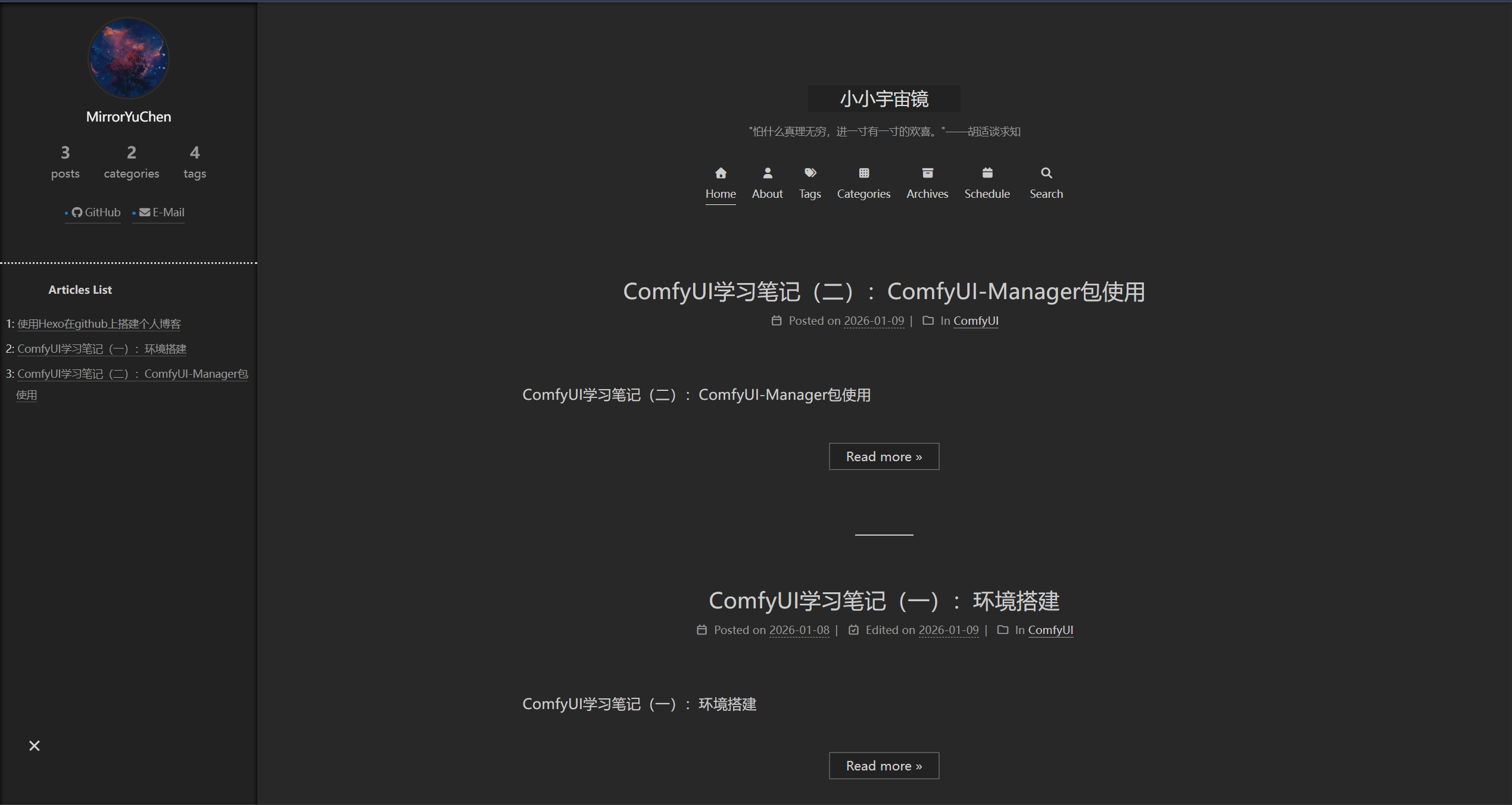
 最后就可以得到如下页面:

hexo_next

参考资料